MPRT vs GtG: Monitor Response Time Explained
Published
On this page
MPRT and GtG are two different monitor response-time specs, and they don’t mean the same thing: GtG (grey-to-grey) is how fast a pixel physically changes color — the number that governs ghosting — while MPRT (Moving Picture Response Time) is how long a pixel stays lit on a moving object, which measures perceived motion blur and is usually only low when backlight strobing is on. For ghosting, trust GtG; for the blur your eye sees while tracking motion, MPRT matters but almost always requires strobing. This guide explains what each number actually measures, why one monitor advertises both, and which one to trust when buying or tuning.
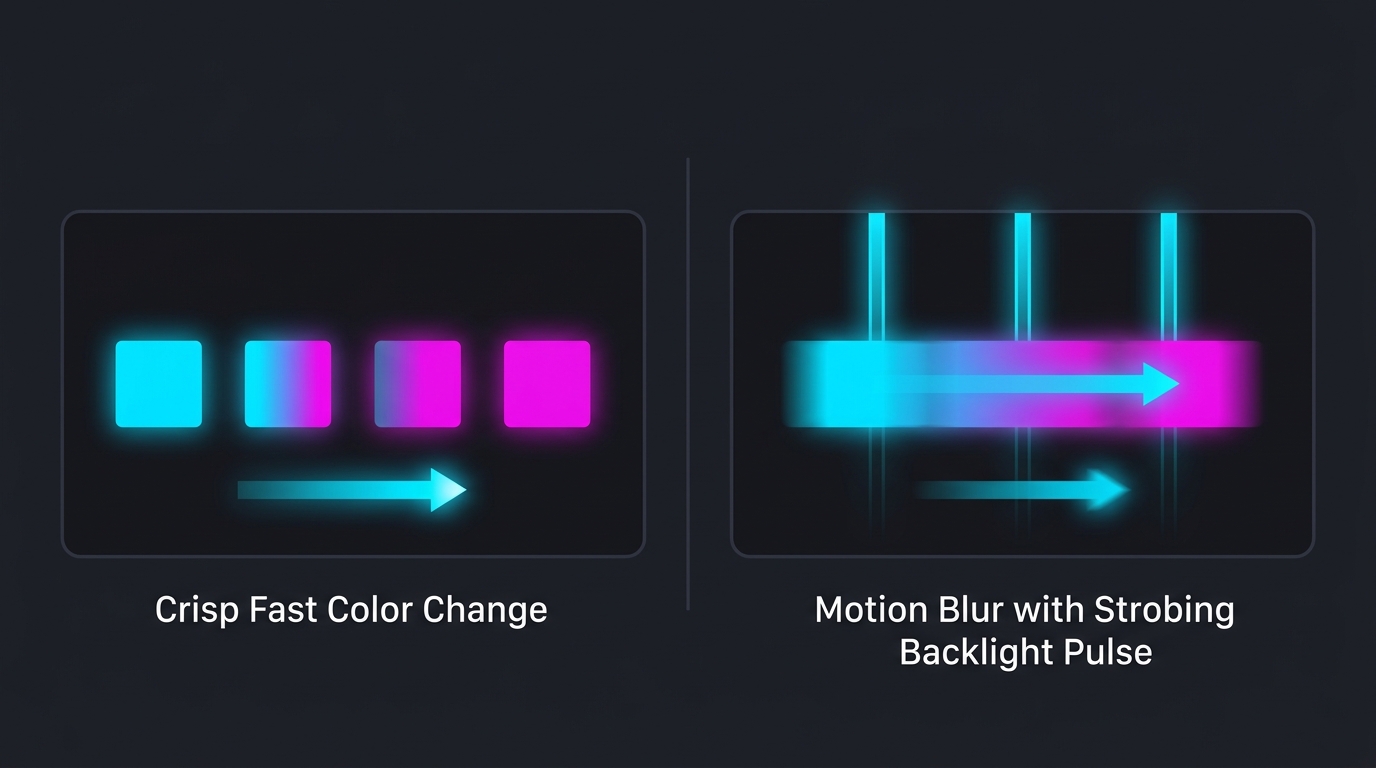
The one-line difference
| Spec | What it measures | Set by | What it predicts |
|---|---|---|---|
| GtG (grey-to-grey) | Time for a pixel to change from one shade to another | Panel hardware + overdrive | Ghosting / smearing |
| MPRT (Moving Picture Response Time) | Time a pixel stays visible on a moving object | Refresh rate + backlight strobing | Perceived motion blur |
GtG describes the panel. MPRT describes what your eye perceives when it tracks motion across the screen. That is why a single monitor can print “1ms GtG” and “1ms MPRT” on the box from two completely different mechanisms.
What GtG (grey-to-grey) actually is
GtG is the real pixel-transition speed — how many milliseconds a pixel needs to shift from one grey level to another. It is the number that determines ghosting: if a pixel can’t finish its transition before the next frame arrives, the old image trails behind moving objects.
Two things to know about advertised GtG:
- Manufacturers quote the fastest single transition, not the average. A panel advertised as “1ms GtG” might average 4–6ms across all the shade-to-shade transitions that actually happen in a game. Independent measurements (the kind review sites publish) are the honest figure.
- Overdrive changes GtG. The monitor’s overdrive setting speeds transitions up, so the real GtG depends on which overdrive level you run — and too much overdrive causes inverse ghosting. See monitor ghosting and overdrive for how to dial it in.
A genuine (measured) GtG of 1–3ms is excellent; 4–8ms is typical for VA and can smear.
What MPRT actually is
MPRT measures perceived motion blur — how long each frame is visible to your moving eye. On a normal “sample-and-hold” display, a pixel stays lit for the entire frame (16.7ms at 60Hz, 6.9ms at 144Hz, 4.2ms at 240Hz), and because your eyes move smoothly while the image holds still for that whole time, you perceive blur even if the pixels themselves are fast.
That’s the key point: MPRT is driven by refresh rate and strobing, not by pixel speed. There are only two ways to lower MPRT:
- Raise the refresh rate — each frame is shown for less time, so 240Hz has roughly a third the MPRT blur of 60Hz.
- Backlight strobing (BFI) — the backlight blanks between frames so each frame is flashed briefly. This is how monitors hit “1ms MPRT”. It works, but it cuts brightness, can flicker, and on most monitors can’t run at the same time as VRR (G-Sync/FreeSync). See motion blur reduction and backlight strobing.
So a “1ms MPRT” claim usually means “we added a strobing mode,” not “our pixels are fast.”
Why one monitor advertises both
Because they come from different hardware, and MPRT is the easier number to shrink. A mid-tier VA monitor with a real 6ms GtG can still advertise 1ms MPRT by including a strobing backlight mode. The GtG tells you the panel is actually a bit slow (expect some dark smear); the MPRT tells you there’s a strobing mode available if you accept dimmer, flicker-prone, VRR-off motion.
When two monitors both say “1ms,” the one quoting 1ms GtG has genuinely faster pixels than the one quoting 1ms MPRT.
Which one to trust when buying or tuning
- Judging ghosting / smearing → GtG (ideally an independent measurement, not the box figure).
- Judging motion clarity for tracking targets → MPRT, but understand it’s a strobing spec: you’ll trade brightness and VRR for it.
- For competitive FPS: prioritize a genuine low GtG and a high refresh rate. Refresh rate lowers MPRT blur without strobing’s downsides, and high refresh rate is what most players actually feel. Whether higher Hz is worth it is covered in is 144Hz worth it vs 240Hz.
- Neither spec is input lag. Response time is not input lag — a fast panel can still add processing delay. Set your monitor up for low latency separately: see how to optimize your monitor and reduce input delay, and reduce the system side of latency with a high, stable frame rate — the smoother your frametimes and the lower your timer resolution, the less delay stacks up before the panel ever draws.
Related guides
Frequently asked questions
What is the difference between MPRT and GtG?
GtG (grey-to-grey) measures how fast a pixel physically changes from one shade to another, so it describes real pixel-transition speed and ghosting. MPRT (Moving Picture Response Time) measures how long a pixel stays lit on a moving object, so it describes perceived motion blur — which is mostly set by refresh rate and backlight strobing, not by the panel's transitions. They measure two different things, which is why one monitor can advertise both '1ms MPRT' and '1ms GtG' from very different hardware.
Is MPRT or GtG more important for gaming?
For ghosting and smearing, GtG is the number that matters — a low GtG means the panel changes colors fast enough to keep up with your frame rate. MPRT matters for the blur you see when your eyes track a moving object, but a low MPRT figure almost always requires backlight strobing (BFI), which cuts brightness and can't run at the same time as VRR on most monitors. For competitive play, prioritize a genuine low GtG and a high refresh rate; treat MPRT as a strobing-only bonus.
Why do monitors advertise 1ms MPRT?
Because MPRT is the easier number to make small. A 1ms MPRT is usually achieved with backlight strobing that blanks the screen between frames, not by fast pixels — so a slow VA panel with a real GtG of 6–8ms can still claim '1ms MPRT'. It's a marketing-friendly spec. Look for the GtG figure (and independent measurements) to judge actual pixel speed.
Does a lower response time reduce input lag?
Not directly. Response time (GtG or MPRT) is how fast the panel shows a change; input lag is how long the monitor takes to process the signal before it starts drawing. They are separate specs. A monitor can have a fast 1ms GtG and still add high processing lag, or vice versa. Reduce input lag with the monitor's Game or low-latency mode and a high refresh rate; reduce ghosting with a good GtG and the right overdrive level.
What is a good GtG response time for a gaming monitor?
For a fast IPS or TN monitor, a real (measured) GtG of 1–3ms is excellent and keeps ghosting invisible at 144–240Hz. VA panels often measure 4–8ms and can show dark smear. Ignore the advertised '1ms' unless it's backed by an independent measurement — manufacturers quote the single fastest transition, not the average across all shades, so the real-world GtG is usually higher.