Tier1Timer
Precise Windows timer resolution control for competitive gamers. Reduce input latency, smooth frame pacing, and auto-switch resolution per game.
Why timer resolution matters
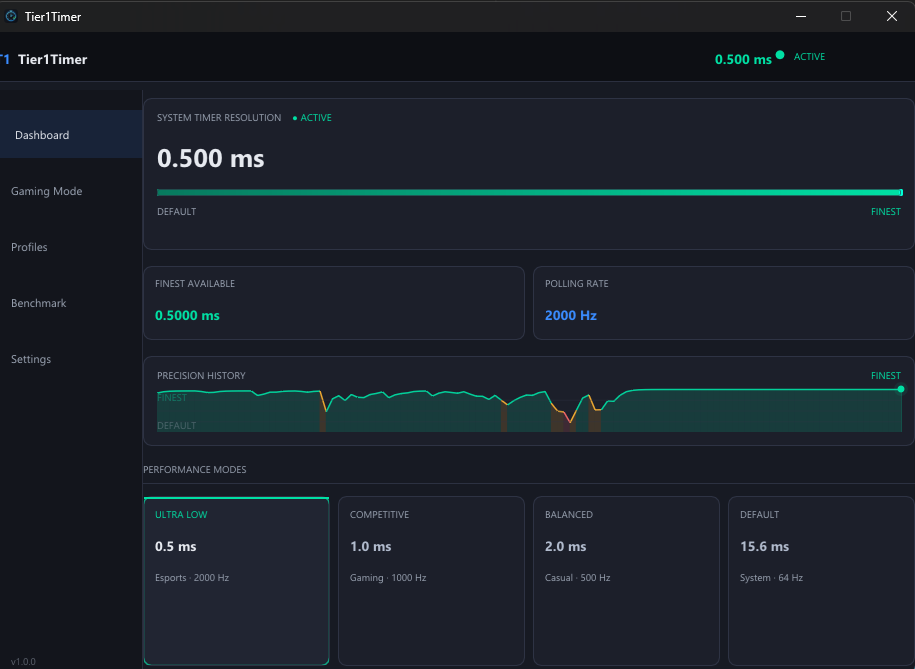
By default, Windows ticks at ~64 Hz (15.6 ms intervals). Any call to Sleep(1) — which games and drivers make constantly — can overshoot by up to 15 ms. Tier1Timer pushes the tick rate to ~2000 Hz (0.5 ms), so your inputs register faster and frames arrive on time.
Features
- Dashboard
Live current, minimum, and maximum resolution display. One-click presets at 0.5 ms, 1.0 ms, 2.0 ms, or system default. Custom slider with immediate apply.
- Auto Mode
Monitors running processes every 500 ms. Applies your per-game resolution when a matching game launches and reverts to idle resolution when you exit. Optional full-screen window detection for any unlisted game.
- Game Profiles
Pre-configured for CS2, Valorant, Fortnite, Apex Legends, Overwatch 2, and more. Add, edit, or remove profiles with the built-in editor. Profiles stored in
%APPDATA%\Tier1Timer. - Latency Benchmark
Measures real
Sleep(1ms)accuracy usingQueryPerformanceCounter. Reports mean overshoot, jitter (std dev), min/max, and estimated interrupt frequency. Live scrolling graph with 256-sample history so you can verify the improvement on your hardware. - Safety Watchdog
Multiple layers (RAII → atexit → SEH → console ctrl) ensure resolution is always restored, even on crash. No kernel driver, no code injection, no process manipulation. Plain MSVC Release build — fully auditable.
- System Tray
Minimizes to tray on close. Right-click for quick resolution presets, show/hide, or exit. Tooltip always shows the current active resolution so you never have to guess what's running.
How to use Tier1Timer
- 1 Download and run Tier1Timer
No installation required. Just download and run the
.exe. The dashboard immediately shows your system's current, minimum, and maximum achievable resolution. - 2 Apply your resolution
Click 0.5 ms for the finest setting, or enable Auto Mode to let Tier1Timer manage it automatically per game. Minimize to the system tray and play.
- 3 Verify with Latency Benchmark
Switch to the Benchmark tab to measure real
Sleep(1ms)accuracy before and after — confirm the improvement on your specific hardware.
Ready to lower your input lag?
Tier1Timer is free, lightweight, and takes under a minute to set up.
Download Tier1Timer — FreeWant the full context first? Read The Ultimate Guide to Timer Resolution for Gaming.