Best FOV for Warzone Black Ops Royale on PC and Console
On this page
The best FOV for Warzone Black Ops Royale is the one that gives you enough awareness on Avalon without making enemies feel too small to track. This guide gives you a practical range to start with and explains how to tune it for your screen, playstyle, and aim feel.
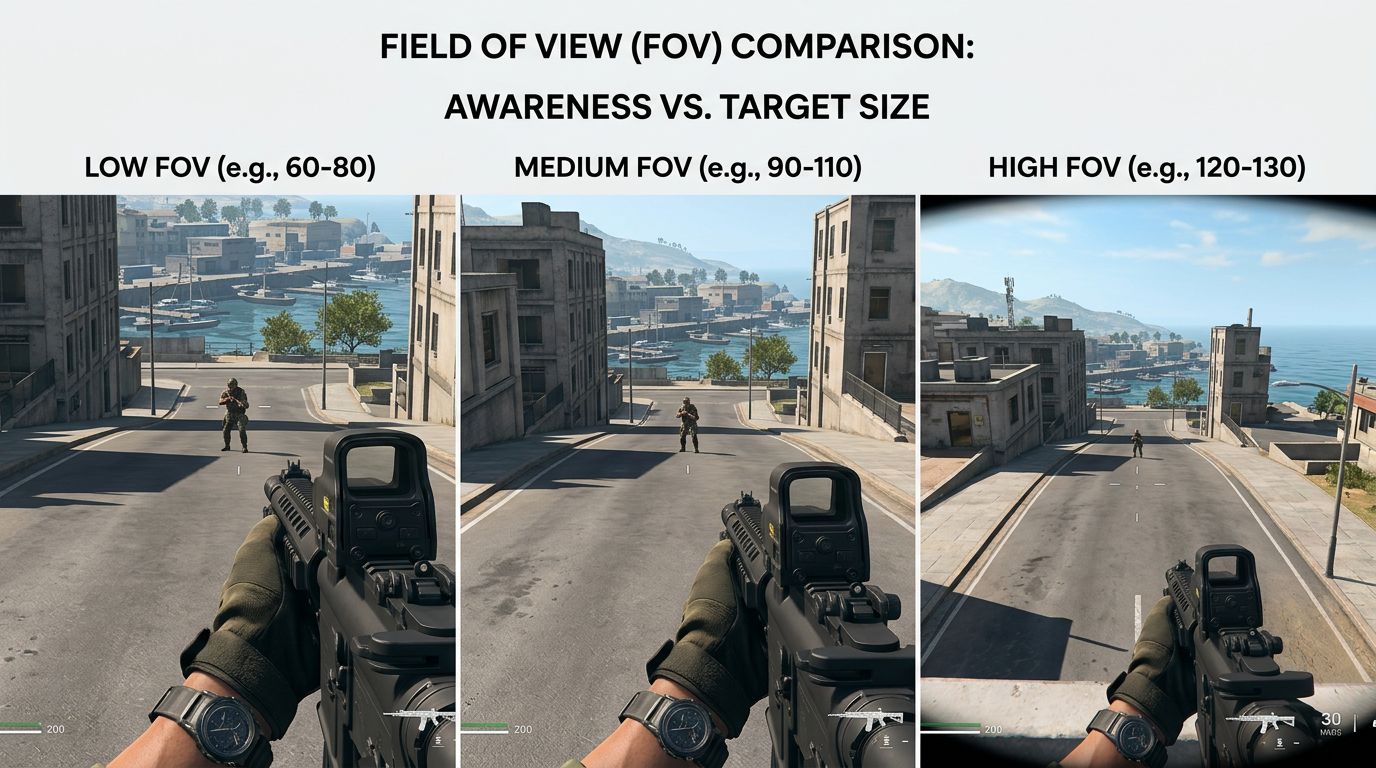
Higher FOV is not automatically better. You want the widest view you can still aim with comfortably.
Best FOV for Warzone Black Ops Royale
For most players, 100 to 110 is the best competitive range.
- use
100to103if you want slightly larger targets - use
104to107for a balanced competitive setup - use
108to110if awareness matters most and distant targets still feel readable
If you sit far from the screen, play on a TV, or struggle with smaller targets, stay closer to the lower end of the range.
Why FOV matters so much in Black Ops Royale
Avalon rewards awareness because fights can move from open streets to rooftops, interiors, shoreline routes, and vehicles very quickly. A good FOV helps you catch extra information on the edges of the screen without constantly swinging your camera.
That said, more awareness is useless if targets become so small that your aim gets worse. This is why FOV should be tuned around real fights, not just how wide the image looks in a menu.
Low, medium, and high FOV tradeoffs
Lower FOV
- bigger targets
- easier distant tracking for some players
- less peripheral awareness
- can feel more tunnel-visioned in close fights
Mid-range FOV
- better balance of awareness and target size
- usually the safest competitive choice
- works well for most monitor sizes and desk setups
Higher FOV
- more awareness and faster edge reads
- better for aggressive movement players
- smaller targets at range
- can make recoil and precision aim feel busier
Best starting point by playstyle
If you play aggressively
Start around 105 to 110. This gives you more awareness during fast pushes, rooftop transitions, and building clears.
If you prefer steadier mid-range fights
Start around 100 to 105. That usually keeps targets a little larger without giving up too much information.
If you are on console or a TV setup
Start at 100 and only move upward if the image still feels easy to read at your seating distance.
ADS Field of View setting
If the game offers an ADS Field of View choice such as Affected or Independent, start with Affected for consistency.
Why:
- your aim feels more in line with your normal movement view
- recoil and target transitions feel less jarring
- the game is easier to learn if hip-fire and ADS views feel connected
If you struggle with long-range target size, test the more zoomed option and compare real match performance instead of sticking with a setting just because it is popular.
Weapon FOV and visual recoil
If Warzone gives you a Weapon FOV option, the wider setting usually helps reduce perceived screen clutter from the weapon model and can make the screen feel cleaner while moving.
Keep the setting that gives you:
- the least distracting weapon view
- the most readable recoil pattern
- the best close-range target tracking
FOV and performance
Higher FOV can increase how much you see at once, which can also increase the amount of visual information your system has to render. It is not always a massive performance hit, but if your PC is already on the edge, extremely high FOV can make the game feel worse.
That is why FOV should be tuned alongside your main graphics setup:
- Best Warzone Black Ops Royale Settings for FPS and Performance
- Warzone Black Ops Royale Best Visibility Settings for Competitive Play
- Warzone Black Ops Royale Stuttering Fix: Stop FPS Drops and Frame Time Spikes on PC
How to test FOV properly
Do not change FOV once and decide instantly. Test it in real matches.
Best method
- play a few matches at
100 - test
105 - test
110 - compare awareness, distant tracking, recoil feel, and close-range comfort
Keep the setting that helps you read fights faster without making aiming feel worse.
Related guides
- Best Warzone Black Ops Royale Settings for FPS and Performance
- Warzone Black Ops Royale Best Visibility Settings for Competitive Play
- Warzone Black Ops Royale Best Audio Settings for Footsteps and Directional Sound
- How to Optimize Your Monitor for Gaming
The best FOV for Warzone Black Ops Royale usually lands between 100 and 110, but the right answer depends on your screen, distance from the display, and how comfortable you are tracking smaller targets. Start in that range, test in real matches, and keep the value that gives you the best mix of awareness and control.